 Long Shot
 AuditX by Long Shot
AuditX: the field audit app for stores, warehouses and sites
Auditors capture checklists, scans and photos on their phone, even offline. Managers review the work, and clients can follow progress and sign off.


How AuditX works
Set up
We configure the app for your engagement: your checklists, items and rules.
Audit on site
Assigned auditors open AuditX and record entries, scans and photos.
Review
Managers check the entries; anything incorrect goes back to be fixed.
Deliver
You get dashboards and a report in your format.
An offline audit app for auditors on site
AuditX is free to download. Sign in with Google, Apple (iPhone/iPad) or email and password. Access is by invitation, and all your assigned audits are inside the one app.
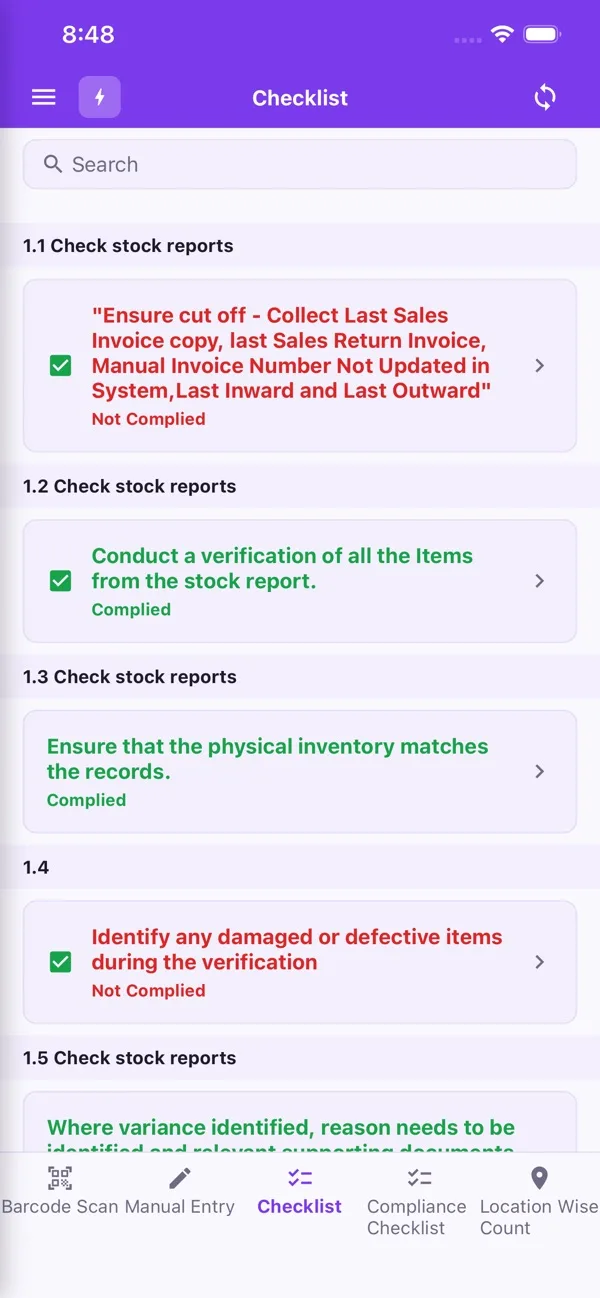
- Structured checklists (Complied / Not Complied / Not Applicable)
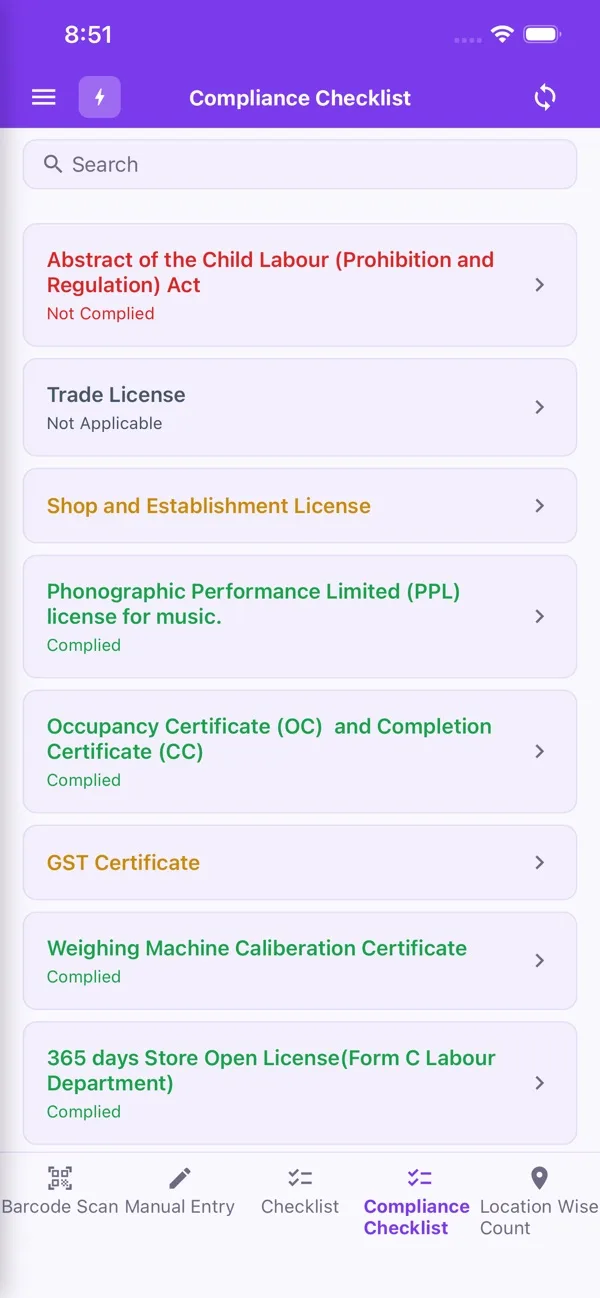
- Licence and compliance document tracking
- Barcode scanning, or manual entry
- Photo and document evidence; photos can be stamped with location and time
- Stock counting location by location
- Works offline; entries sync when the connection returns
- Reviewer remarks come back to the auditor to fix
For audit managers and clients
For audit managers
- Review each entry, mark it correct or incorrect, add remarks
- Live dashboards: progress, stock reconciliation (matched / short / excess / not found), auditor attendance
- Reports in Excel or PDF, in the client’s format
For clients
Switched on per engagement. Where available, clients can use:
- Client dashboard and share links to follow an audit
- Review entries and mark them correct or incorrect
- Location-wise and report sign-off with an emailed one-time code
Audits you can run with AuditX
Use it as a stock audit app, a fixed asset verification app or a store audit checklist app for teams in India.
Fixed-asset verification
Verify assets on site against your asset register.
Fixed asset verification services →Store compliance
Run checklists and track licences, with photo evidence.
Outlet asset checks
Confirm assets placed at outlets and record their condition.
Evidence you can trust
- Photos stamped with location and time (where enabled)
- Review remarks and fixes on each entry
- Access limited to the people invited to each audit
- Data stored on Google Cloud and sent over HTTPS
AuditX FAQs
What is AuditX?
A mobile app from Long Shot for field audits: checklists, scanning, photos and stock counts.
Who can use AuditX?
Auditors and teams invited to an audit run through Long Shot. After sign-in you see only your assigned audits.
I installed it and see no audits. Why?
No audit has been assigned to the email you signed in with. Check that you used the invited email, or contact your audit coordinator.
Does it work without internet?
Yes. You can keep recording; entries sync when you are back online.
Which phones are supported?
Android through Google Play; iPhone and iPad (iOS 15.1 or later) through the App Store.
Is AuditX free?
The app is free to download. For audit services and pricing, contact us.
Is AuditX the same as the Long Shot Assignments app?
No. Assignments is for finding work; AuditX is for carrying out audits.
How is my data handled?
See the AuditX privacy policy.
How do we use AuditX for our company’s audits?
Contact us with your audit type, locations and timeline.